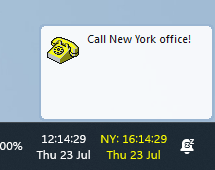
1st Clock enhances taskbar clock with date, time zones, alarms, atomic time, calendar, resources and more...

What's new in 1st Clock 5.2?

Windows 11 taskbar support Pro & Classic

1st Clock 5.2 adds support for replacing and customizing the taskbar clock on Windows 11.

The Windows 11 taskbar uses a different clock implementation from earlier Windows versions. Version 5.2 adds a new integration path for the Windows 11 taskbar while retaining the established Classic path for Windows 10.

1st Clock Pro running on the Windows 11 taskbar
1st Clock Pro 5.2
1st Clock Classic running on the Windows 11 taskbar
1st Clock Classic 5.2

Your familiar clock features on Windows 11

  • Custom date and time formats, fonts, colors and backgrounds.
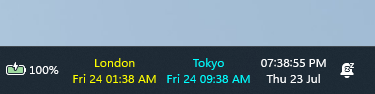
  • Multiple taskbar clocks and time zones in 1st Clock Pro.
  • Alarms, reminders and Internet time synchronization in 1st Clock Pro.
  • Popup calendar, time-zone tooltip, clipboard formats and resource indicators.

Multiple time zones displayed on the Windows 11 taskbar

Upgrade policy

Customers who purchased 1st Clock 5.1.1 receive a free upgrade to the corresponding edition of 1st Clock 5.2. Customers with earlier paid versions can upgrade with a 50% discount.

System requirements

Windows 10 or 11.

Download the 30-day trial of 1st Clock 5.2

Download and Try 1st Clock Classic completely free for 30 days!

Download and Try 1st Clock Classic completely free for 30 days!

Get a full version of 1st Clock Classic now!

Get a full version of 1st Clock Classic now!

Contact us!

Having questions? Click here to contact us!

Subscribe!

Subscribe to our newsletter:

RSS news feed 1st Clock RSS news feed

1st Clock

"This is the nicest program of it's kind that I've ever looked at..." - Dr. File Finder
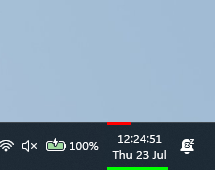
1st Clock Classic running on the Windows 11 taskbar

Latest version: 5.2 new
Read what's new...

Download and Try 1st Clock Classic completely free for 30 days!

Download and Try 1st Clock Classic completely free for 30 days!

Get a full version of 1st Clock Classic now!

Get a full version of 1st Clock Classic now!

Contact us!

Having questions? Click here to contact us!

Subscribe!

Subscribe to our newsletter:

RSS news feed 1st Clock RSS news feed

We offer you a 30-day no-questions-asked money-back guarantee!
In a very unlikely event of you not being fully satisfied with 1st Clock you get your money back, no questions asked!

System Requirements:
Windows 10 or 11

You may also consider the following software:

ActionOutline - store and arrange all your information in a tree outline form

1st AutoRun Express - make autorun CDs that will run your documents, web pages, presentations etc. No programming or design required!

And more...